
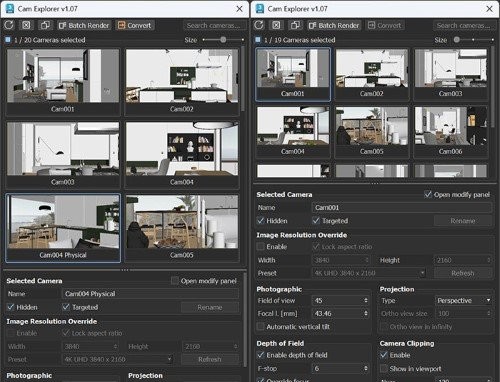
CamExplorer v1.12 for 3ds Max 2024-2027
CamExplorer v1.12 for 3ds Max 2024-2027
- Cam Explorer puts every camera in the scene in front of you as a thumbnail, and every setting you would normally reach through the Modify panel in one place beneath them. Select a thumbnail to look through that camera, or select several to change them all at once.
WHAT IT DOES
– Each camera appears as a thumbnail, with its settings:
– name, resolution override, field of view and focal length, projection, depth of field and clipping.
– Rename one camera from the Name field, or several at once through Batch Rename.
– Delete, duplicate and search from the toolbar.
– Batch Render adds a view per camera, with the format options for JPG, PNG, TIF, BMP, EXR and Corona CXR.
– Convert changes the selected cameras to Corona Cameras, keeping position, target and field of view.
– Exposure settings do not carry over.
REQUIREMENTS
Autodesk 3ds Max 2027 (x64). Best with Corona Cameras.
Physical and V-Ray cameras work too, with unsupported settings greyed out.
INSTALL
1. Drag CamExplorer_v1.07.mzp into a viewport and press Install / Run.
2. Customize > Customize User Interface > Toolbars
Category: CamExplorer – drag ‘CamExplorer’ onto a toolbar.