Coloso – Vibrant Candy Style Skillset With Efficient 3D Lighting Assistance
Coloso – Vibrant Candy Style Skillset With Efficient 3D Lighting Assistance
https://coloso.global/en/products/illustrator-yeejchan-zh
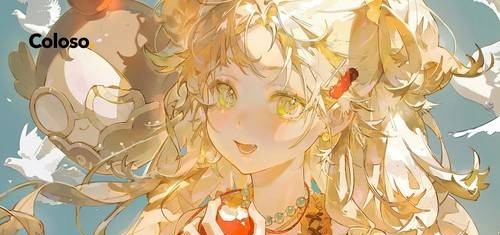
Stop muddy colors! Join a top gaming illustrator to master high-saturation painting and Blender 3D lighting. Learn the candy-color logic and create commercial-level, vibrant anime girl illustrations.
Instructor: yeejchan_ZH | Lessons: 27 | Duration: 52 Hours 58 Minutes | Materials: Included | Software: Adobe Photoshop 2023, Blender 4
Skills You’ll Learn: Capture the Public with Luminous Candy Color Techniques • Master Spatial Lighting Instantly with Blender • Skin Rendering & Fabric Fold Techniques That Elevate Every Detail • Unlock Transparent Atmospheres with a Drawing-Based Lighting Technique • Dynamic Hair Flow & Three-Dimensional Form Techniques for Lifelike Movement • Craft Irresistible Lovely Girl Portraits That Stand Out Instantly
Curriculum
- 08. Portrait Refinement Demo: 3D-Assisted Lighting Analysis
- 01. Introduction
- 02. Composition of the Image
- 03. The Relationship Between Linework and Sketching
- 04. Rendering the Head, Facial Features, and Key Facial Structures
- 05. Facial Lighting Practice
- 06. Hair Drawing Techniques and Dynamic Expression
- 07. Portrait Refinement Demo: Sketch Stage
- 09. Portrait Refinement Demo: Final Rendering Details
- 10. Human Body Proportions and Structure
- 11. Coloring Hands and Legs
- 12. Drawing and Rendering Clothing Folds
- 13. Comprehensive Human Anatomy Practice
- 14. Light and Shadow Analysis & Application
- 15. Lighting: Two-Tone Character Shading
- 16. Color Relationships and Practical Application
- 17. Transparent Color Rendering and the Principle of Hidden Colors
- 18. Composition Design
- 19. Character Design Sketches
- 20. Illustration – Drawing the Rough Sketch
- 21. Illustration – Using 3D Assistance as Workflow References
- 22. Illustration – Creating the Color Rough
- 23. Illustration – Clean Line Art (Refined Sketch)
- 24. Illustration – Two-Tone Lighting and Shadow Rendering
- 25. Illustration – Thick Painting Refinement and Background Rendering
- 26. Illustration – Final Color and Filter Adjustment Techniques to Enhance Completion
- 27. Congratulations on Completing the Course!
01.mp4
02-1.mp4
02-2.mp4
02-3.mp4
03-1.mp4
03-2.mp4
04-1.mp4
04-2.mp4
04-3.mp4
04-4.mp4
05-1.mp4
05-2.mp4
06-1.mp4
06-2.mp4
06-3.mp4
06-4.mp4
07-1.mp4
07-2.mp4
07-3.mp4
08.mp4
09-1.mp4
09-10.mp4
09-11.mp4
09-12.mp4
09-13.mp4
09-14.mp4
09-15.mp4
09-16.mp4
09-17.mp4
09-18.mp4
09-19.mp4
09-2.mp4
09-20.mp4
09-21.mp4
09-22.mp4
09-23.mp4
09-24.mp4
09-25.mp4
09-26.mp4
09-27.mp4
09-28.mp4
09-29.mp4
09-3.mp4
09-30.mp4
09-4.mp4
09-5.mp4
09-6.mp4
09-7.mp4
09-8.mp4
09-9.mp4
10-1.mp4
10-2.mp4
11-1.mp4
11-2.mp4
11-3.mp4
11-4.mp4
11-5.mp4
12-1.mp4
12-2.mp4
12-3.mp4
13-1.mp4
13-2.mp4
13-3.mp4
13-4.mp4
14-1.mp4
14-2.mp4
15-1.mp4
15-2.mp4
16-1.mp4
16-2.mp4
17-1.mp4
17-2.mp4
18.mp4
19.mp4
20.mp4
21-1.mp4
21-2.mp4
22-1.mp4
22-2.mp4
23-1.mp4
23-2.mp4
24-1.mp4
24-2.mp4
24-3.mp4
24-4.mp4
24-5.mp4
24-6.mp4
24-7.mp4
24-8.mp4
25-1.mp4
25-10.mp4
25-11.mp4
25-12.mp4
25-13.mp4
25-14.mp4
25-15.mp4
25-16.mp4
25-17.mp4
25-18.mp4
25-19.mp4
25-2.mp4
25-20.mp4
25-3.mp4
25-4.mp4
25-5.mp4
25-6.mp4
25-7.mp4
25-8.mp4
25-9.mp4
26.mp4
27.mp4
Files.part1.rar
Files.part2.rar