Udemy – AI Image & Video Generation: From Beginner to Expert
Udemy – AI Image & Video Generation: From Beginner to Expert
https://www.udemy.com/course/ai-image-video-generation-from-beginner-to-expert/
Language: English (US)
Create AI images, videos, voices and music in one tool: prompting, consistent characters, editing and real projects.
Want to create images and videos with AI but have no idea where to start? Or maybe you’ve already tried, and your results look like everyone else’s?
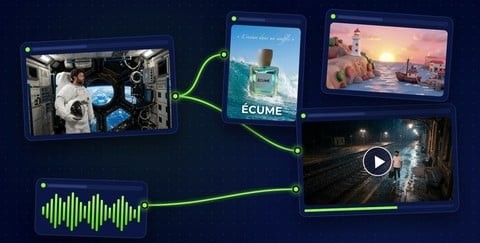
This course takes you from your very first image all the way to complete projects: a product ad, a short film with two characters, a carousel and a reel for social media. Everything happens in one tool, Imaginode, a canvas where each step plugs into the next: a text node writes the prompt, the image becomes a video, a voice-over and music are added, and the editor puts it all together.
Every lesson follows the same rhythm: a little theory, kept simple and visual, then a demo on the real canvas that you can follow along with, and finally the three mistakes to avoid, with a short exercise.
No magic promises here: you’ll see real results, including the times a model gets it wrong. A dropped accent, a real brand’s logo drawn without being asked, a face that drifts at the end of a video, a glass bottle that turns opaque in 3D. You’ll learn to spot these traps, and how to fix them.
The comparisons are tested, not copied from a spec sheet. The same prompt on six image models. The same shot on four video models: Seedance, Wan, Kling and Veo. The actual tempo of a generated track. The noise left over after cleaning up a voice recorded in a busy café.
Here’s what you’ll cover, in eight parts:
- Getting started: how AI makes an image, and a tour of the canvas.
- Images: your first image, choosing a model, writing a prompt that works, talking like a photographer, visual styles, text inside the image.
- Consistency: reference images, a recurring character, the Camera node, product photography.
- Retouching: editing with instructions, inpainting, the layered Retouch node, cutouts, outpainting, restoring old photos, upscaling.
- Video: text to video, image to video, start and end frames, camera moves, the models compared, dialogue, keeping a character consistent from shot to shot, motion control, lip-sync, video background swaps, upscaling and smoother motion.
- Sound: voice-over, multi-voice dialogue, sound effects, music, audio cleanup.
- Expert level: one-click workflows, video editing, templates, the assistant, 3D objects, 3D Previz.
- Projects and best practices: three projects from start to finish, making your credits go further, rights and ethics.
As a extra, an eight-video module shows you how to make a complete film with ScreenWeaver: script, characters, storyboard, retouching, video and export.
Nothing to install and no graphics card needed: a web browser is all it takes. Generations use Imaginode credits, and the price always shows before you click. A whole lesson is dedicated to spending them wisely.